
Overdubber
Looper and multitrack recorder for iPhone, iPad and Mac.
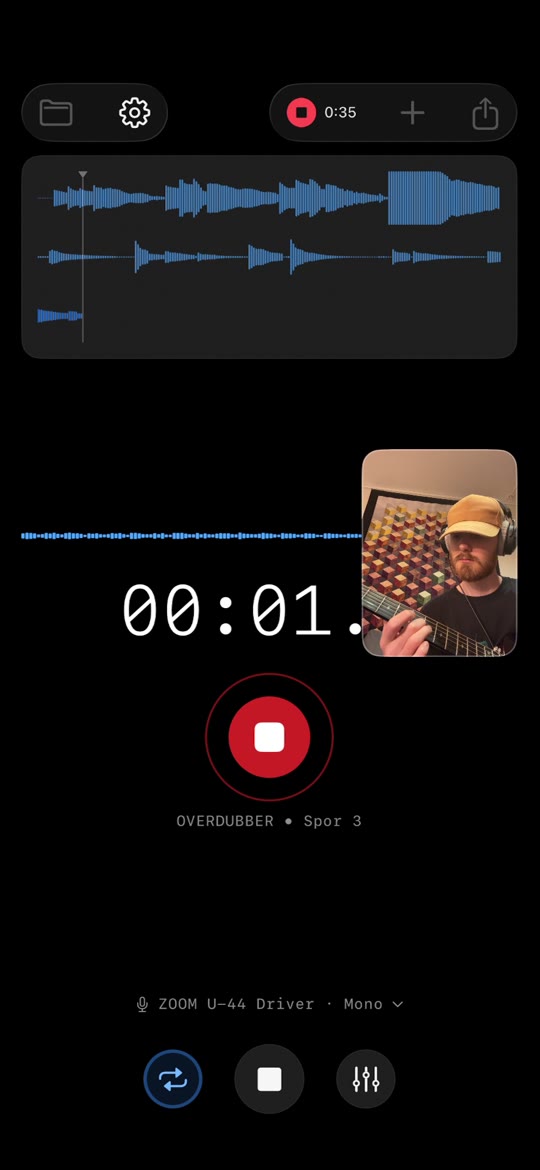
Overdubber records vocals and instruments in layers. Record a part, listen back while you add the next, and keep building. Sing a harmony, add guitar to a melody, or build a beat one part at a time.
It is free to start, with no account and no subscription. It runs on iPhone and iPad with iOS or iPadOS 17 or later, and on Mac with macOS 14 or later.
Who it is for
Overdubber is for musicians who want to capture an idea without setting up a full digital audio workstation. People use it to stack vocal harmonies, layer guitar, beatbox, build loops, practise a part over a backing track, and sketch songs.
What you can do for free
- Record up to eight layers per project.
- Stay in time with a metronome and count-in.
- Loop your recording to practise or add another part.
- Trim takes, adjust their timing and add fades. The original recordings are not changed.
- Balance each layer with volume, pan and mute.
- Record with optional tape warmth, which becomes part of the take.
- Add reverb and Glue compression to the mix.
- Export the finished mix as WAV or M4A, and share it to Files, AirDrop or other apps.
- Come back to projects that save automatically, and find them by name in your library.
- On iPhone and iPad, record a Session: a video of the app with a picture-in-picture camera view of you playing, made for sharing how the layers come together.
What the one-time purchase adds
- Unlimited layers.
- Audio import, so you can record over backing tracks and samples.
- Individual-track export: each layer as a separate WAV file in a ZIP, for mixing further in another music app.
- More themes.
- No ads on iPhone and iPad. The Mac version has no ads to begin with.
You pay once. There is no subscription.
What it is not
Overdubber is an audio recorder, not a full studio. It has no MIDI, no virtual instruments and no plug-in hosting. When a sketch outgrows it, export the layers as separate tracks and carry on in the music app you prefer.
Accessibility
On iPhone and iPad, Overdubber works with VoiceOver. In the recorder, Magic Tap (a two-finger double tap) starts and stops a take. There are spoken recording updates and input-level information, and the mixer and clip editor have labelled, adjustable controls. Layouts adapt to larger text, and mute and loop states use symbols as well as colour. Reduce Motion is respected on every platform.
Privacy
Your recordings and projects stay on your device. They are never uploaded by the app. The free version on iPhone and iPad shows non-personalised ads, and the app sends anonymous usage events so I can see which features are used. Details are in the privacy policy.
Questions and answers
Which languages does Overdubber support?
Overdubber supports 23 interface languages: English, Arabic, Danish, French, German, Hebrew, Hindi, Indonesian, Italian, Japanese, Korean, Norwegian Bokmål, Polish, Portuguese, Simplified Chinese, Spanish, Swedish, Thai, Traditional Chinese, Turkish, Ukrainian, Urdu and Vietnamese.
Is Overdubber free?
Yes, to start. The free app records up to eight layers per project, lets you mix them, and exports the finished mix as WAV or M4A. It shows ads on iPhone and iPad; the Mac version has none. A one-time purchase unlocks unlimited layers, audio import, individual-track export and more themes, and removes the ads on iPhone and iPad.
Does Overdubber require a subscription?
No. The extra features are unlocked with a single one-time purchase. There is no subscription and no account.
Can I record vocal harmonies on my iPhone?
Yes. Record your first vocal part, then listen back through headphones while you record a harmony on a new layer. Repeat to add more parts.
Can I export separate audio tracks?
Yes, with the one-time purchase. Your layers are saved as separate WAV files in a ZIP, ready to open in another music app. Exporting the finished mix as WAV or M4A is free.
Can I record guitar with an external audio interface?
Yes, with an audio interface that iOS or iPadOS recognises as an input. Connect it before you start recording, then check the input source in Overdubber. The adapter and power supply you need depend on your device and interface. On Mac, Overdubber records from the input selected in System Settings.
Does Overdubber work with VoiceOver?
Yes, on iPhone and iPad. In the recorder, Magic Tap starts and stops a take. Overdubber gives spoken recording updates and input-level information, and the mixer and clip editor have labelled, adjustable controls. It also supports larger text and Reduce Motion.
Is Overdubber the same as the OverDubber delay plug-in?
No. Overdubber is a recording app for iPhone, iPad and Mac made by Thorbjørn Bonvik. It is not connected to OverDubber, the delay effect plug-in for desktop music software.